- Blog
Stop guessing at your power bill: check every line against what you already paid
Bill Analyzer makes your electricity bill audit a few minutes of work instead of an afternoon. Vantage Settlements settles your power costs every day, so your supplier’s end-of-period statement should be a small true-up. Checking that true-up has always been on you, and it usually arrives as a dense PDF at the end of a long month. Now you upload the statement, and Bill Analyzer shows, line by line, exactly where your supplier and Vantage Settlements disagree.
What’s new: a line-by-line audit of your supplier invoice
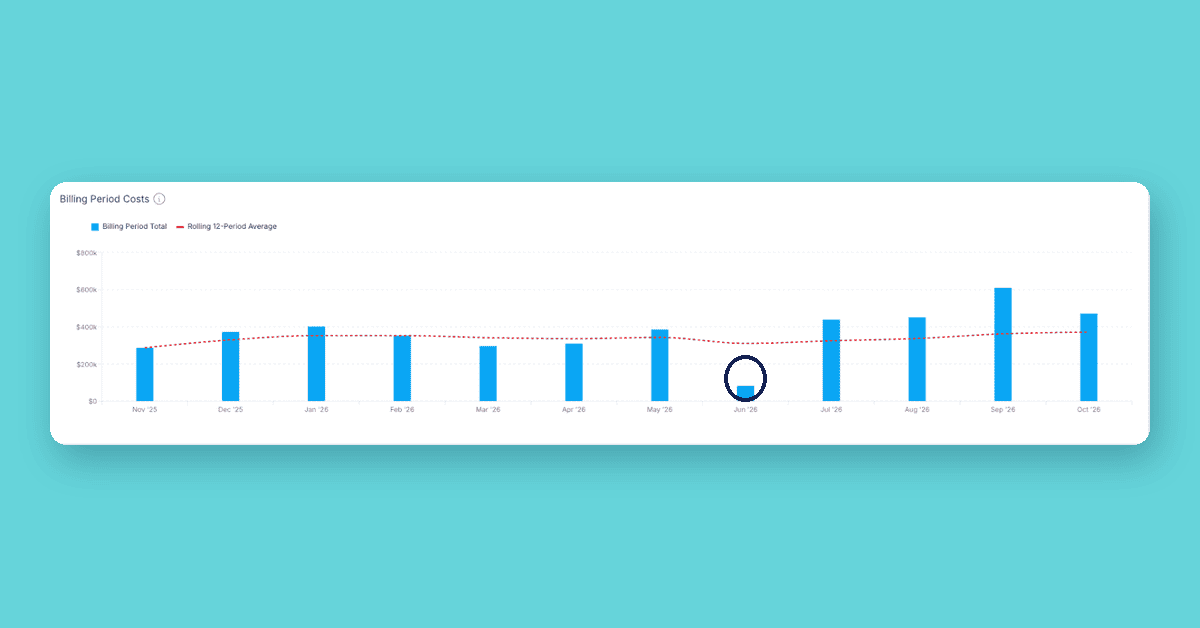
A year of costs at a glance. The Billing Period Costs chart shows your total for each billing period over the last 12 months, with a rolling 12-period average. An odd month jumps out right away, so you know where to start looking.
Every billing period in one list. Periods are listed newest first. Each one is labeled so you know what you’re looking at: Period in progress, Vantage Settlements Estimate, or Supplier Invoiced once you’ve uploaded the statement.
The detail behind each period. Open a period to see:
- Total cost for the period, and how it compares with the prior period
- Average daily cost
- Energy consumed (MWh)
- Effective rate per kWh
- A cost breakdown by category: energy, utility, taxes and contract charges
- Every line item with its quantity, rate, and change from the last billing period
Your supplier’s statement, checked for you. Upload the supplier’s PDF for a closed period. Bill Analyzer reads it with AI and matches each charge to the one Vantage Settlements calculated. The Compare view puts them side by side: the Vantage Settlements amount, the supplier amount, and the gap in dollars and percent. Open any line to see whether the difference comes from the quantity or the rate.
Each line gets a plain status: Matched, Underbilled, Flagged, or Not modeled by invoice. You decide what counts as worth a look. Set a dollar amount, a percentage, or both, and anything over that line gets flagged.
Estimates, actuals, or both. On any period, switch between Vantage Settlements’ own numbers (Estimates), your audited supplier statement (Actuals), and the side-by-side check (Compare).
How to audit your electricity bill with Bill Analyzer
- Open Bill Analyzer in your dashboard.
- Pick a closed billing period from the list.
- Click Upload invoice and choose your supplier’s statement for that period (PDF, up to 10 MB).
- Give it a few minutes while it processes.
- Open Compare and review anything flagged.
The cost chart, period list and period detail need no setup. They fill in on their own.
Good to know
- Who can upload. Anyone on your team can view Bill Analyzer. Uploading needs bill-management permission, which admins have by default.
- Closed periods only. A new period usually shows up the day after it ends, and always within 3 days. Up to 24 months of history can be shown.
- File limits. PDF only, up to 10 MB. The statement’s dates need to cover the whole billing period.
- One meter per account. If your account has no meter or more than one on file, the upload is turned away. Reach out to support and we’ll sort it out.
- Uploading again replaces the earlier one. Got a corrected statement? Use Reupload and it takes the place of the first.
- A flag is a prompt to look, not proof of an error. Some suppliers print all delivery charges as one combined line. When that happens, Vantage Settlements’ separate delivery lines can show as unmatched even when the totals agree.
- Availability. Bill Analyzer is being turned on account by account. Don’t see it yet? Ask your account manager. [CONFIRM rollout wording]
Frequently asked questions
What is an electricity bill audit?
An electricity bill audit checks each charge on your supplier’s statement against what you should have paid. Each line is checked on usage, rate, and total, so errors and unexpected charges surface before you pay.
How do I audit my commercial electricity bill?
Compare each charge on the supplier’s statement with what you expected to pay: the quantity, the rate, and the total. Bill Analyzer does that matching automatically against Vantage Settlements and only asks you to review the lines that don’t line up.
What are the most common electricity bill errors?
The most common are wrong rates, wrong quantities, and charges that are missing or billed twice. In Bill Analyzer’s Compare view, you can open any flagged line to see which one it is.
Does a flagged line mean I was overcharged?
Not always. A flag means the gap is bigger than the threshold you set. Some suppliers combine delivery charges into one line, which can show as a mismatch even when the totals agree. Treat a flag as a cue to look closer, not a final answer.
How long does a bill audit take with Bill Analyzer?
A few minutes. Upload your supplier’s PDF for a closed billing period, and Bill Analyzer reads it with AI and matches each charge for you.
Bill Analyzer turns your electricity bill audit from an afternoon into a few minutes. Want to see what it finds on your bill? Book time with our team for a walkthrough, and bring last month’s statement.
Subscribe to OBM’s Blog
More from OBM

Using Trusted Pools to Protect Your Fleet

OBM and OCEAN Bring DATUM to Foreman

OBM Announced as a Finalist for the Platts Global Energy Awards